 Eloshon
Switching e-commerce platforms is not just a matter of moving a few products from one shop to another. Each platform (Shopify, WooCommerce, PrestaShop, Wix, BigCommerce, Shopware) organises variants, attributes, categories, prices, stock, images, customers and orders differently.
And that is the trap: a migration can look successful when it has silently left part of the catalogue behind. No error, no warning message. Just incomplete products, broken filters, or variants that vanished without anyone noticing for several weeks.
This guide explains why it happens, how to avoid it, and how Eloshon Converter was designed specifically for this problem: never lose a piece of data without saying so.
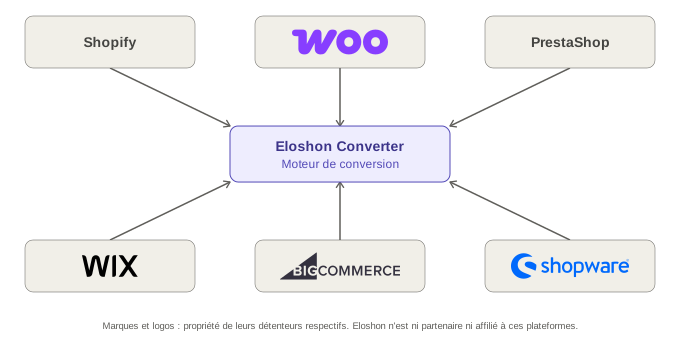
Why an e-commerce migration loses data
If you have never run an online shop, here is the basic principle: a product catalogue is usually moved as a CSV file (a data table, a bit like a simplified Excel file) that you export from one platform and then import into another.
The problem is that this file is only a flat table. It says nothing about how each platform understands the data it contains. Let's take a concrete example.
A T-shirt comes in 3 colours and 4 sizes. On WooCommerce, this information is stored as “attributes” tied to technical columns such as attribute_pa_color. On Shopify, the same concept is called a “variant option”, with a strict technical limit: 3 options and 100 variants per product (2,048 on the most recent catalogues via a dedicated API, but still with a limit). On Shopware, a product can only be assigned to the lowest category level; if it is assigned to an intermediate category, it becomes invisible in the shop without any error being shown.
A simple “source column → target column” mapping cannot guess these rules. Nor can it guess that renaming an option value on Shopify (for example changing “Size: XL” to “Size: X-Large”) makes the platform treat the variant as entirely new, silently deleting the old variant and its stock even though the reference (SKU) has not changed. This is not a hypothesis: it is a documented case, reported several times on the official Shopify community, on catalogues of more than 1,500 products.
Other pitfalls come up again and again, all documented on the platforms' own help forums:
- Dynamic collections (based on automatic rules) that turn back into fixed categories once migrated: the data still exists, but its behaviour has changed without anyone explicitly deciding so.
- Attribute names not written in English (accents, Arabic or Asian characters) that break automatic variant matching.
- Categories nested more than 8 levels deep that are abruptly pushed back to the root on BigCommerce.
- A source currency other than the euro that silently makes an entire import fail on Shopware: the tool reports success, but not a single product has actually been created.
- External supplier files (such as a BigBuy export) rejected over a simple column header issue or badly escaped quotes, or worse, accepted with prices multiplied by a conversion error.
None of these cases is inevitable. But none of them can be detected by simply copying and pasting columns either. You need to understand what each piece of data represents, not just what it is called.
The Eloshon Converter method: convert, preserve, flag
This is the core principle of Eloshon Converter: for every piece of data it meets in a catalogue, the tool never just copies it blindly or lets it disappear. It always follows one of these three paths.
| Path | What happens | Example |
|---|---|---|
| Converted | A direct equivalent exists on the target platform | A price, a SKU, a main image |
| Preserved | No direct equivalent, but the data is kept in another usable form (often a metafield) | A technical specification with no dedicated field (warranty, material, energy class) |
| Flagged | No reliable conversion is possible, so the user is warned rather than the data disappearing | Several columns that all seem to describe a product's colour |
In practice: if a WooCommerce file contains Color, attribute_pa_color and option_1 at the same time, a conventional converter will apply a fixed rule, even if that means getting it wrong on a poorly cleaned catalogue. Eloshon Converter recognises that several columns are competing for the same variant information and asks rather than guesses: “Which column really represents the colour?”
That is the difference between a migration that seems to have worked and a migration where you know exactly what was transferred, transformed or left aside.
What Eloshon Converter handles
- Products and variants, including complex combinations (colour + volume on the same product, a very common case in cosmetics, and one that raises questions on the Shopify forums when migrating from PrestaShop).
- Prices, stock and quantity tiers, distinguishing prices excluding VAT, prices including VAT, sale prices and tiered prices, rather than reducing everything to a single
pricecolumn. - Images, keeping, where possible, the link between a specific image and a variant (colour, combination), not just a generic gallery.
- Categories and hierarchies, including cases where the source platform allows category assignments that the target refuses, or where the target limits depth (BigCommerce).
- Product identifiers (EAN, GTIN, UPC, ISBN): a field that several migration tools leave out by default, which often forces manual configuration afterwards.
- Translations and multilingual shops.
- Metadata and custom fields.
- Orders and customers, with two specific points to watch.
Marketing consent is not transferable by default
A customer who agreed to receive marketing emails on the source shop has not automatically given that consent for the new shop. A “consent: yes” field in the source file is not enough to justify reusing it in a new context. Eloshon Converter treats this field as separate data that calls for an explicit decision rather than a simple copy.
Order and invoice numbering
A real, documented example: on BigCommerce, order numbers are incremental, and the original number technically cannot be preserved during a migration, a point that directly affects accounting obligations on invoice numbering. For a business subject to invoice sequence obligations, a migration must never arbitrarily rewrite that sequence, nor create gaps or duplicates. Eloshon Converter explicitly separates bringing over the order history from the numbering logic for new invoices, taking into account the obligations that apply to the business in its jurisdiction.
Why Shopify, WooCommerce, PrestaShop, Wix, BigCommerce and Shopware cannot be compared column by column
Each platform has its own internal rules, often invisible until you run into them:
| Platform | Concrete technical constraint |
|---|---|
| Shopify | 3 options and 100 variants per product natively (up to 2,048 via a dedicated API, with a daily creation cap to watch on large catalogues) |
| WooCommerce | Global attributes, local attributes and custom fields (ACF) coexist without a strict hierarchy; variation keys must be “slugified” in exactly the expected format, otherwise the frontend no longer recognises the variants |
| PrestaShop | Combinations (colour + volume on the same product page) and an EAN/GTIN field often missing from default migrations |
| Wix | Customer passwords never transferable (as everywhere else), gallery limited to 19 images per product on import |
| BigCommerce | Category depth limited to 8 levels, incremental order numbering that cannot be rewritten |
| Shopware | Products must be assigned to the lowest category level; sensitive to currency and special characters during import |
None of these constraints is a flaw in the target platform; they are simply different rules. The problem appears when you ignore them.
Real-world cases by migration direction
WooCommerce → Shopify. The source file contains taxonomies and attributes (pa_heel-height, pa_brand, product_cat). Without explicit mapping to Shopify metafields, this information lands nowhere usable: it is there, but invisible to product filters. Eloshon Converter identifies these relationships before export rather than afterwards.
Shopify → WooCommerce. Shopify's “smart” collections (based on automatic rules, for example “all products tagged summer”) become fixed categories on WooCommerce. The data is still there, but its dynamic behaviour disappears: a typical example of the “preserved but transformed” case.
PrestaShop → Shopify. A real, documented case on a 900-product cosmetics catalogue: the products combine colour and volume variations on the same product page. The EAN field, often missing from standard migrations, has to be explicitly requested. Without 301 redirects (the rules that automatically send an old URL to the new one), one real case showed an ongoing traffic loss that was hard to diagnose several months after the migration.
Wix → Shopify or WooCommerce. ERP, CRM and carrier integrations, often limited on the Wix side, have to be rebuilt rather than migrated as they are. Blog post images rarely follow the text.
BigCommerce → Shopify or WooCommerce. Complex product options (a B2B catalogue with tens of thousands of products) do not map 1:1 onto Shopify's 3 native options. One real, documented case required a complete restructuring of a product, going from 5 options and 1,708 variants to a compatible model.
Shopware → Shopify or WooCommerce. Category links read from Shopware are rebuilt according to the target platform's rules. A product that cannot be linked is flagged in the report instead of silently disappearing from the storefront.
No clean export? Eloshon Scraper takes over
Not every migration starts from a clean export. A competitor, a supplier or an old shop without admin access often provides no usable file, only a public website to browse page by page.
Eloshon Scraper turns this public information into structured data, which Eloshon Converter can then adapt to the target platform:
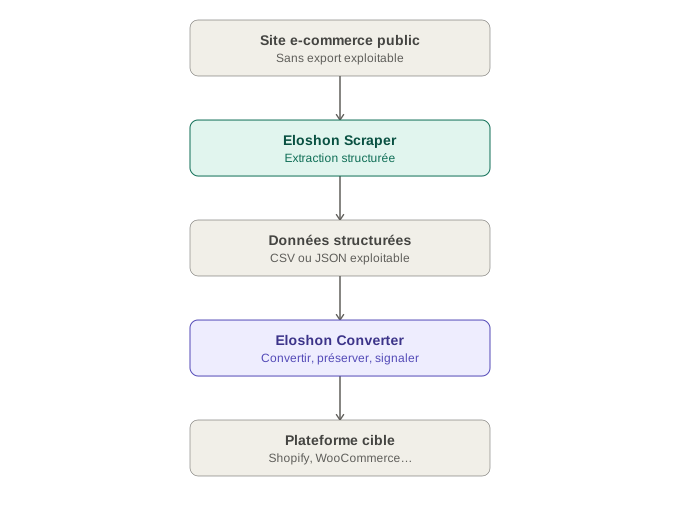
This is exactly the kind of problem faced by businesses working with external supplier feeds (dropshipping, wholesalers): a CSV export received as is can be rejected over a simple column header issue or, worse, imported with wrongly converted prices without anyone noticing until customers complain. The Scraper + Converter pair covers this case end to end: extract, structure, check, convert.
Please note: the brands or sites cited as examples in this context are neither clients nor partners of Eloshon; they illustrate the technical possibilities of scraping. Any use of the collected data must always respect the access conditions of the site concerned and the applicable regulations.
Who it is for
E-commerce merchants who are changing platform, taking over an existing catalogue, or preparing a new sales channel.
E-commerce agencies that handle client migrations, clean up mixed catalogues, or process undocumented files from multiple sources.
Why not just a CSV mapping
Two files can both contain the columns name, price, sku, category while representing completely different business models. CSV is only a transport format; the real question is: what does each piece of data mean, and what is it linked to?
It is this layer of understanding, not just matching, that lets Eloshon Converter correctly handle variants, attributes, categories, prices, images, stock, translations and orders, without ever making information disappear without saying so.
In summary
A successful e-commerce migration is not measured by the number of rows that reach the destination file. It is measured by the ability to answer precise questions: which variants were recognised, which images kept their links, which data had no equivalent, and which need a human decision.
Eloshon Converter, together with Eloshon Scraper for cases without a clean export, was designed so that these questions always have an answer, rather than staying hidden behind an “Import” button.
For the practical steps of a migration (export, intermediate format, supported directions, 301 redirects), see also How to migrate a Shopify, WooCommerce, Wix, BigCommerce or PrestaShop shop?